
Zoho data migration is often treated as a technical step in a larger Zoho implementation. In reality, it is one of the most critical phases that directly impacts reporting, automation and decision-making.
During a typical setup of Zoho CRM or Zoho One, businesses move large volumes of data from spreadsheets or legacy systems. The expectation is simple clean transfer, better organization and improved visibility.
However, when data migration is not structured, it creates long-term problems. Duplicate records, inconsistent formats and missing relationships enter the system. Once this happens, reports become unreliable, automation behaves incorrectly and teams lose trust in the CRM. This is not a migration issue alone. It is a data design problem.
Table of contents
Key insights from failed data migration projects
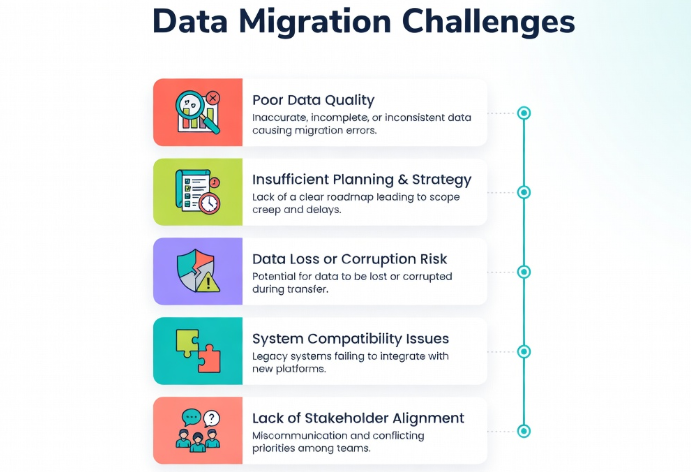
Zoho data migration failures rarely happen because of tools. They happen because data is moved without structure. In many Zoho CRM implementation scenarios, businesses import data exactly as it exists in spreadsheets. No cleaning, no validation, no standardization. This carries forward existing issues into the new system.
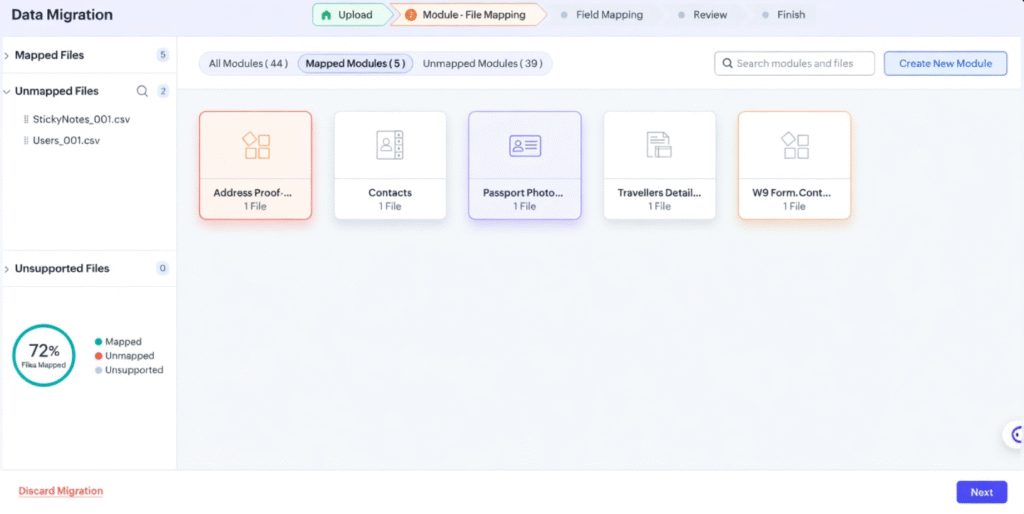
Another common pattern is the absence of field mapping logic. Data is placed into incorrect fields or without relationships, making it difficult to use later. When data migration is treated as a structured process rather than a one-time task, these issues are avoided.
What causes Zoho data migration to go wrong?
Zoho data migration fails when data is transferred without aligning it to system structure.
Tools like Zoho CRM and Zoho Books depend on clean, connected data to function correctly. Migration should include extracting, cleaning, mapping and importing data in a way that maintains accuracy and usability.
If you are planning a migration or fixing an existing one, you can book a consultation here to evaluate your current data structure.
Root causes behind data migration failure
The primary issue is lack of data preparation. Data is often assumed to be usable as-is, even when it contains duplicates, missing values, or inconsistent formats.
Another cause is incorrect field mapping. CRM fields are created, but source data does not align with them. This leads to broken relationships between leads, contacts and deals. There is also a lack of validation rules during migration. Without checks, incorrect or incomplete data enters the system freely.
Ownership gaps further impact outcomes. When no one is responsible for data quality, errors go unnoticed until reporting issues appear. Finally, migration is often rushed to speed up implementation, leading to long-term inefficiencies.
Real Zoho data migration mistakes (and their impact)
1. Importing raw spreadsheet data
One of the most common mistakes in Zoho data migration is directly importing spreadsheet data without cleaning it.
Spreadsheets often contain duplicates, outdated records, and inconsistent formats. When this data is moved into Zoho CRM, these issues become part of the system. This leads to duplicate leads, incorrect reports and confusion during follow-ups.
2. No data standardization before migration
Data fields such as company names, phone numbers and deal values are often stored in different formats.
Without standardization, the same type of data appears in multiple formats inside the CRM. This makes filtering, reporting and automation difficult. Zoho data migration should always include formatting rules before import.
3. Incorrect field mapping
Field mapping defines where each piece of data will go in the Zoho CRM.
When mapping is done incorrectly, important information is either misplaced or lost. For example, deal-related data might be mapped to lead fields, breaking the entire sales tracking process. Proper mapping is essential in Zoho CRM implementation.
4. Missing data relationships
CRM systems rely on relationships between modules such as leads, contacts, accounts and deals.
During Zoho data migration, these relationships are often ignored. Data is imported as isolated records instead of connected entities. This results in broken pipelines and incomplete visibility.
5. Ignoring data deduplication
Duplicate records are one of the biggest challenges after migration.
When deduplication is not performed before import, the system ends up with multiple entries for the same customer. This impacts reporting, communication and automation. Deduplication should be a mandatory step in Zoho data migration.
6. No validation or testing
Many migrations are executed without testing the data after import.
Without validation, errors remain hidden until they affect reporting or workflows. Fixing these issues later requires significant effort. Testing should include checking data accuracy, relationships and reporting outputs.
7. Treating migration as a one-time task
Zoho data migration is often treated as a one-time activity instead of a structured process.
There is no plan for data cleanup, updates, or maintenance after migration. Over time, data quality declines again. Migration should be part of an ongoing data management strategy.
Real costs of bad Zoho data migration
Poor Zoho data migration has a direct business impact.
Sales teams lose visibility into leads and deals. Reports do not reflect actual performance. Automation triggers incorrectly, affecting follow-ups and communication.
Fixing these issues later requires re-cleaning data, rebuilding reports, and reconfiguring workflows. This increases both time and cost. More importantly, decision-making becomes unreliable due to inaccurate data.
If you’re already facing these problems, you can submit your details here for a quick audit of your CRM data.
The right way to execute data migration
A structured approach improves outcomes significantly. The process starts with a data audit. Existing data is reviewed for duplicates, inconsistencies and missing values. This step defines what should be migrated and what should be removed. Next comes data cleaning and standardization. Formats are aligned, duplicates are removed and fields are prepared for mapping.
Field mapping is then defined based on CRM structure. Each data point is aligned with the correct module and field in Zoho CRM. A test migration should follow. A small dataset is imported to validate accuracy, relationships and reporting. Once validated, the final migration is executed. Post-migration checks confirm that data is accurate and usable.
Zoho data migration process (step-by-step model)
A structured Zoho data migration typically follows three phases.
The first phase focuses on preparation, including data audit and cleaning. The second phase involves migration, where mapping and import are executed. The final phase focuses on validation, ensuring data accuracy and system usability.
This phased approach reduces errors and improves long-term data quality.
Fixing a failed Zoho data migration
A services company migrated data into Zoho CRM directly from spreadsheets.
The result was duplicate leads, broken relationships and unreliable reports. Sales teams struggled to track deals and automation failed to trigger correctly.
The migration was restructured by cleaning data, redefining field mapping and rebuilding relationships between modules. After validation, the system started reflecting accurate pipeline data.
Within weeks, reporting improved and manual effort reduced.
Himcos approach to Zoho data migration
Zoho data migration success depends on the execution model.
Scratch migration focuses on complete data restructuring before import. Fixed scope migration works for clearly defined datasets. Hourly engagement supports ongoing data cleanup and optimization.
Each approach aligns with business requirements and data complexity.
Book a free consultation
Businesses facing issues with Zoho data migration can benefit from a structured audit.
This includes reviewing data quality, field mapping, duplication and reporting accuracy. The outcome is a clear plan to fix data issues and improve system performance.
Consultation and booking options are available for both new and existing Zoho implementation projects.
To get started, you can book a free consultation or reach out via this contact form
Key takeaways
- Data migration defines the quality of the entire CRM system.
- Poor migration leads to inaccurate reporting, broken automation and low adoption.
- A structured approach involving data cleaning, mapping and validation improves outcomes and reduces long-term costs