
Zoho One brings together more than 50 applications into a single platform designed to manage everyday business operations. Instead of expanding only in terms of tools, the 2026 version focuses on improving how these tools connect, interact, and support decision-making.
As businesses scale, the way teams store, access, and use information needs to evolve. Systems are expected to reduce delays, improve coordination, and adapt to changing workflows. At this stage, the new features of Zoho One 2026 become relevant as organizations move toward connected and intelligent operations.
Rather than acting as a generic implementation provider, Himcos works as a specialized Zoho partner, building custom system architectures and integrations tailored for SMBs and healthcare businesses.
Table of contents
What changed in Zoho One 2026
Recent updates, often referred to as Zoho One 25, reflect a broader shift in how the platform operates. The focus is centered around three areas: experience, intelligence, and integrations.
The platform now delivers a more connected interface where users move across applications without friction. Administrators manage everything through centralized controls, while users interact with dynamic layouts that adjust based on activity.
These updates improve navigation speed and reduce time spent switching between tools. As a result, teams shift focus from managing systems to executing tasks with better clarity.
The problem: Fragmented systems
Most organizations operate with multiple tools that do not communicate effectively.
Data exists, but it is spread across systems. Sales insights remain inside Zoho CRM, financial data sits separately, and support interactions are not linked to decision-making. This creates delays in execution and reduces visibility across teams.
The issue is not the absence of tools, but the lack of connection between them.
Why inefficiency increases
As businesses grow, inefficiencies increase due to system limitations.
Manual coordination continues between teams. Reporting depends on combining data from different sources. Workflows remain static and do not adapt to real-time changes.
User adoption also becomes a challenge when interfaces are complex or inconsistent. This results in incomplete data and unreliable insights, which further slows down decision-making.
How Zoho One 2026 improves system connectivity
Zoho One introduces a more connected and adaptive structure.
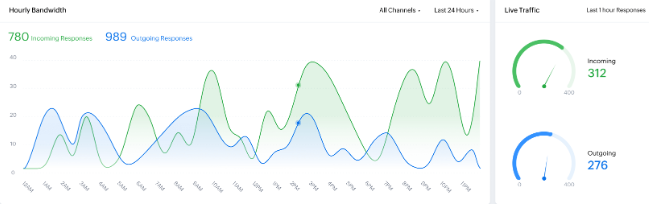
Applications are no longer isolated. Data flows across systems in real time, and actions in one module trigger updates in others. This reduces manual handovers and improves execution speed.
AI adds another layer by analyzing patterns and suggesting next steps, helping teams act faster and with better accuracy.
New features across experience, AI, and integrations
1. Spaces for organized work environments
Spaces introduce a structured way to organize work across teams. Instead of navigating through multiple apps, users access everything within dedicated zones based on roles or departments.
A sales space may include CRM data, communication tools, and dashboards in one place. This improves focus and reduces time spent switching between tools. Permissions are applied at the space level, allowing better control over access.
Spaces also improve onboarding, as new users enter a pre-structured environment rather than learning multiple systems separately.
2. Dashboard 2.0 with live insights
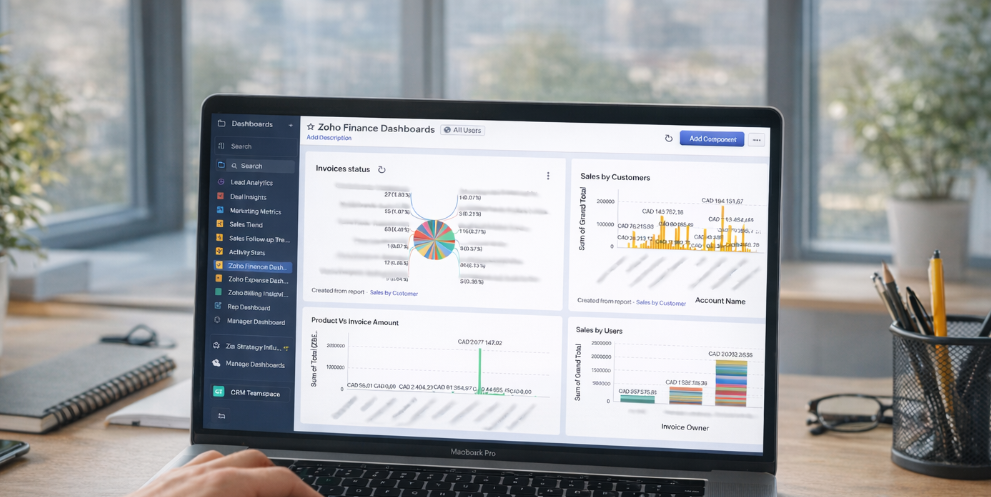
Dashboard 2.0 transforms reporting into a real-time experience. Users build dashboards using live widgets that pull data from different applications.
Instead of static reports, dashboards update continuously and allow deeper analysis through filters and drill-down options. Finance teams, for example, can view expenses alongside inventory or revenue in a single view.
This reduces dependency on external reporting tools and improves decision-making speed.
3. Boards for contextual collaboration
Boards provide a flexible workspace for planning and collaboration. Teams create visual workflows using notes, charts, and task flows.
Unlike static task lists, boards support real-time collaboration. Changes are tracked automatically, and updates reflect across connected applications like Zoho Projects.
4. AI intelligence powered by Zia
Zia becomes a central intelligence layer across Zoho One. It analyzes data from multiple applications and provides insights, predictions, and recommendations.
Instead of reacting to data, teams receive proactive suggestions. This includes identifying trends, flagging risks, and automating routine decisions.
5. Ask Zia for conversational insights
Ask Zia allows users to query data using natural language.
Questions like sales performance comparisons or revenue trends generate instant responses with visual insights. Data is pulled from CRM, finance, and HR systems based on the query.
This makes data access easier for non-technical users and reduces reliance on manual reporting.
6. Zia Hubs for pre-built automation
Zia Hubs provide ready-to-use AI workflows for common business tasks.
These include lead scoring, invoice matching, and operational monitoring. Businesses activate these workflows and customize them based on requirements.
This reduces setup time and accelerates automation adoption.
7. Predictive analytics and anomaly detection
Predictive tools analyze historical and real-time data to forecast outcomes such as sales trends or customer behavior.
Anomaly detection identifies unusual patterns like unexpected expenses or irregular system activity. This helps businesses respond early and reduce risks.
8. Advanced integration capabilities
Zoho One expands its ability to connect with external platforms.
Systems like e-commerce tools, communication platforms, and third-party applications integrate directly, allowing data to move without manual input. Himcos builds these integrations based on business workflows to improve efficiency.
9. Multi-step workflow automation
Workflows now support multiple stages and conditional logic.
For example, employee offboarding can trigger access removal, documentation updates, and payroll adjustments automatically. This reduces manual effort and improves process consistency.
10. Centralized admin and security controls
Administration becomes more structured with centralized control over users, applications, and data.
Security improvements include multi-factor authentication, encryption, and compliance tracking. Businesses gain better control over data access and system activity.
New applications expanding Zoho One
Zoho One 2026 introduces additional applications that extend its capabilities.
- Vani supports visual collaboration and brainstorming.
- Thrive focuses on employee engagement and feedback tracking.
- Log360 Cloud improves security monitoring and threat detection.
- LandingPage simplifies campaign-based website creation.
- Zoho RPA automates repetitive tasks using software bots.
These additions expand how businesses use the platform beyond core operations.
Implementation approach by Himcos
Adopting the new features of Zoho One 2026 requires a structured approach.
Himcos begins by evaluating the current system and identifying gaps. Based on this, a rollout plan is created to introduce features in phases.
Spaces and dashboards are tested with smaller teams before scaling. AI features are introduced gradually to improve adoption. Integrations are prioritized based on business impact.
Continuous monitoring helps refine workflows and improve performance over time.
Business impact and outcomes
The new features of Zoho One 2026 lead to measurable improvements.
Task execution becomes faster due to reduced system switching. Decision-making improves as insights become readily available. Operational costs decrease as multiple tools are replaced by a unified system.
In real scenarios, businesses have improved inventory management using Zia Hubs and enhanced project execution through collaborative boards. These outcomes highlight the practical value of a connected system.
Book a free Consultation
Businesses planning to adopt Zoho One 2026 features can work with Himcos for structured implementation.
Himcos focuses on aligning system configuration with business workflows, building custom integrations, and improving adoption across teams.
Key takeaways
- Zoho One 2026 focuses on connected systems rather than isolated tools.
- AI improves how data is used across business functions.
- User experience updates improve system adoption.
- Integrations reduce manual data movement.
- Structured implementation determines long-term success.